My Personal Level Up: Cracking the Code of OSCAL’s Technical Architecture — Part 3
05/21/2026
Carl Markowski
Cybersecurity Engineer
Introduction
Hello! I am back for the third iteration of my journey: Cracking the Code of OSCAL’s Technical Architecture. In our previous deep dive, we moved through the theoretical layers of the OSCAL stack, dissecting how Catalog, Profile, and Component Definition files provide the structural DNA for the System Security Plan. We explored the rigid schemas and the precise metadata required to make these files machine-readable. But as I mentioned last time, theory only takes us so far. It’s time to move from the classroom to the lab.
Today’s Agenda
In today’s post, we are building the “Sync Engine”—a Python-based automation script that bridges the gap between a static security plan and a dynamic cloud environment. Specifically, we will demonstrate how to programmatically update a System Security Plan (SSP) by “inheriting” the technical narratives defined in a Component Definition.
But we aren’t stopping at a simple copy-paste. To show the true power of the OSCAL ecosystem, our script will also query a Plan of Action and Milestones (POA&M) model. By using unique UUIDs as a “digital glue,” the script will check for any open remediation actions associated with a control. If a weakness is found, the script doesn’t just update the text; it automatically “demotes” the control’s status and injects a warning directly into the SSP, ensuring that your compliance documentation reflects the actual, real-time risk of your system.
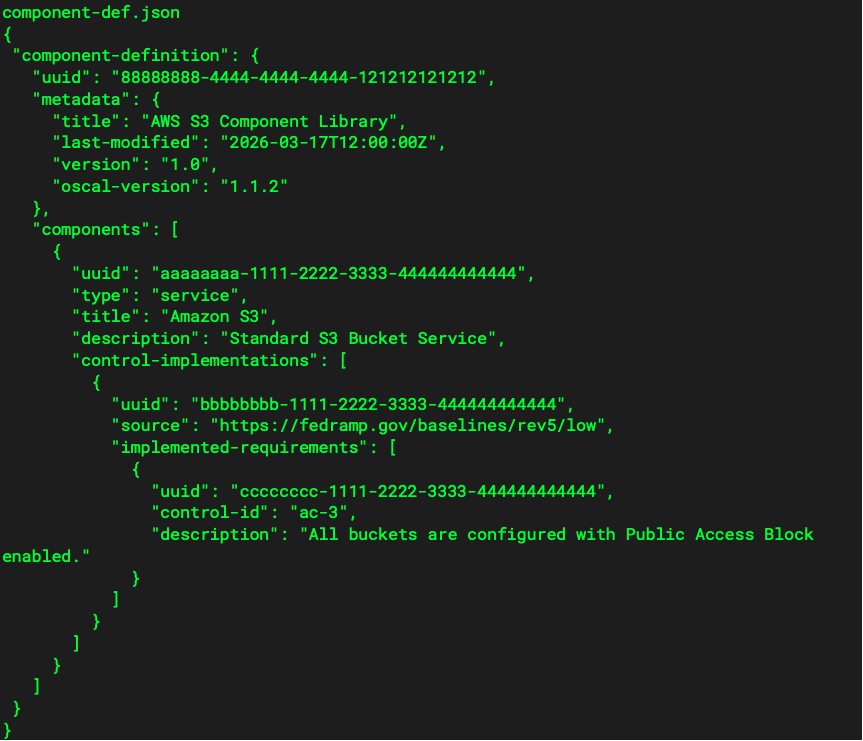
Before diving into the script, let’s take a look at the models that we will be using for this demonstration starting with the component-def.json.
Before we move onto the SSP, I wanted to stop for a second and highlight the component UUID: “aaaaaaaa-1111-2222-3333-444444444444”, and the control UUID: “cccccccc-1111-2222-3333-444444444444”. These two UUIDs will come in handy in the SSP and POAM files.
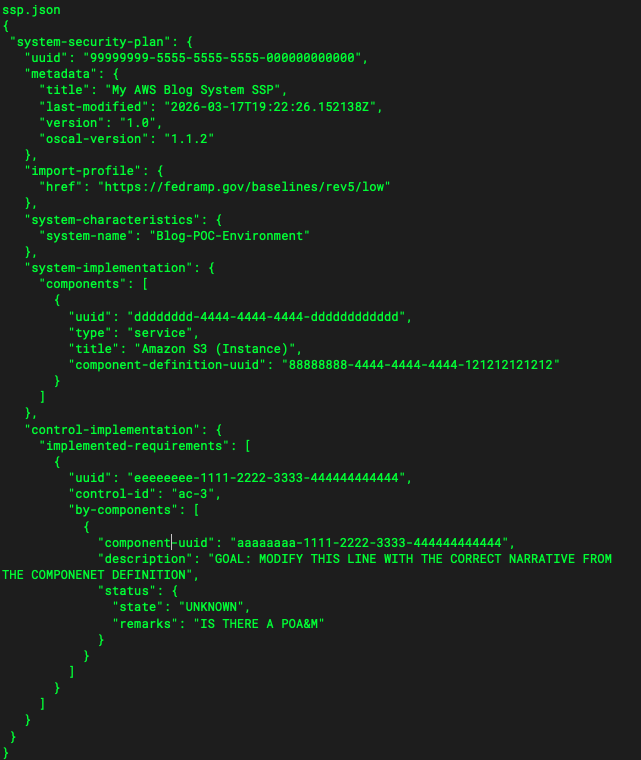
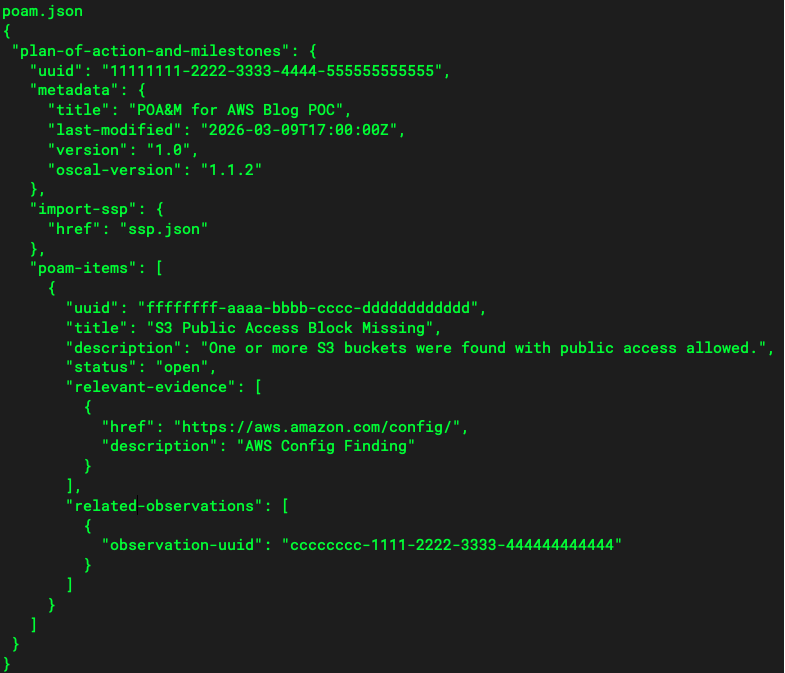
Looking at the SSP, we can see that the component UUID is under the AC-3 control. This is where the “glue” comes to play between the models within the OSCAL architecture. We can also see that the component description has a goal in it. When we perform the sync, this is where the new narrative should be. We can also see the status is “unknown” and the “remarks” section is asking if there is a POAM. This will be important after we run the sync script! The final OSCAL model we are using today is the POAM model which can be seen below.
Remember that other UUID from the component definition that I said would be important? Well here it is, “cccccccc-1111-2222-3333-444444444444″. This UUID is what links the component definition to its relevant POAM.
Ok so we have laid out the ground work for our new OSCAL implementation and we now have a new narrative for our S3 bucket that helps answer for AC-3. We need a nice script that will help us do that. After all, automation is the new thing in this industry.
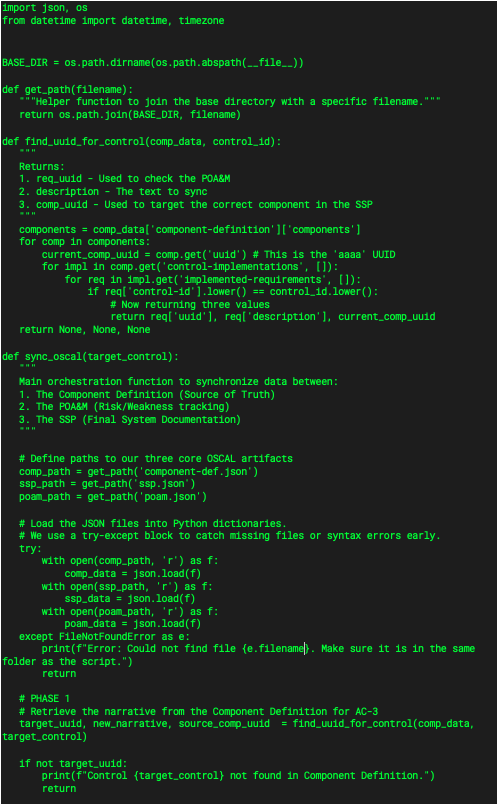
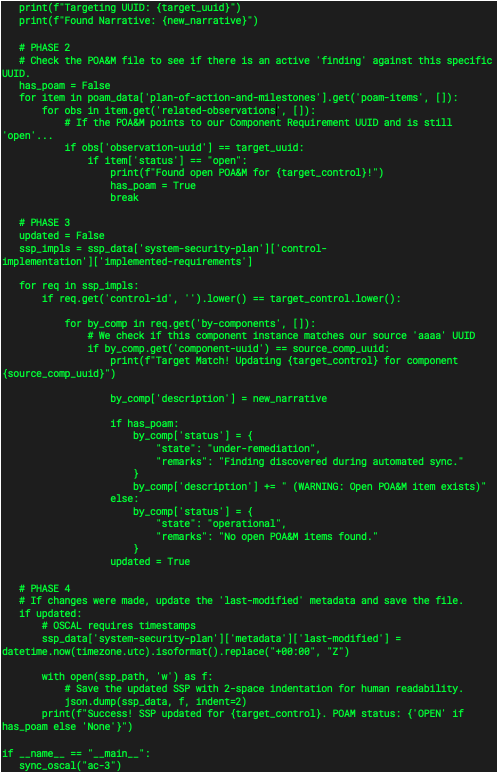
I have broken the script into four phases and will walk through each phase with the corresponding code snippet. Don’t worry! I have provided the full script at the end of this post so you can mess with it and see what you can do in your own lab!
PHASE 1:
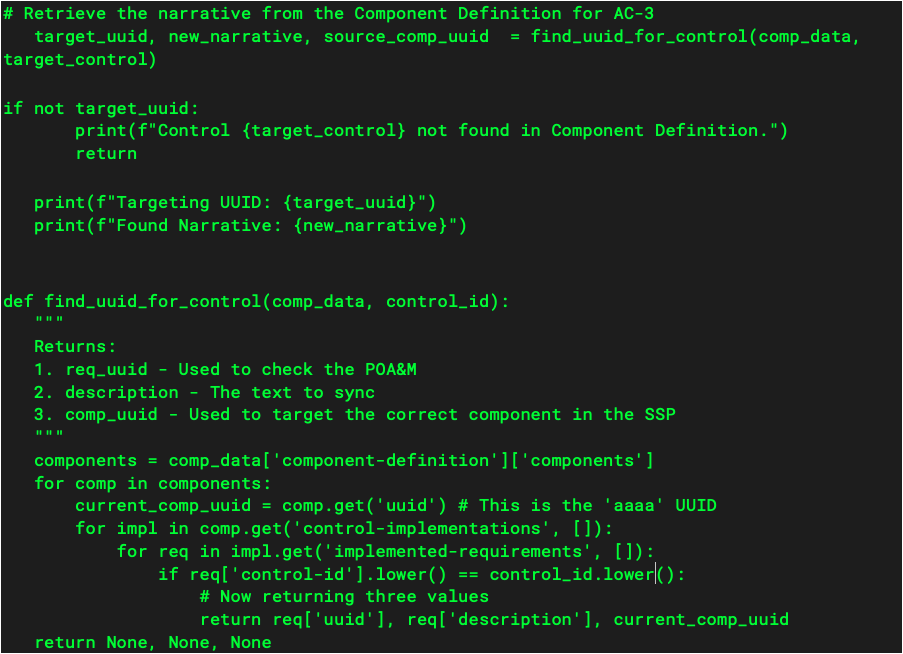
In phase 1 we need to start by getting the new narrative and important UUIDs from the component-def.json file. I created a function called “find_uuid_for_control” that has the component-def.json information and control-id as parameters. This function and call can be seen below:
In the function we are just navigating through the JSON structure of the component definition file to retrieve the necessary information that we need. Starting with the “current_comp_uuid”, this is the UUID for the component itself. We then navigate to the implemented requirements where we can retrieve the narrative and the requirement UUID to use later on.
PHASE 2:
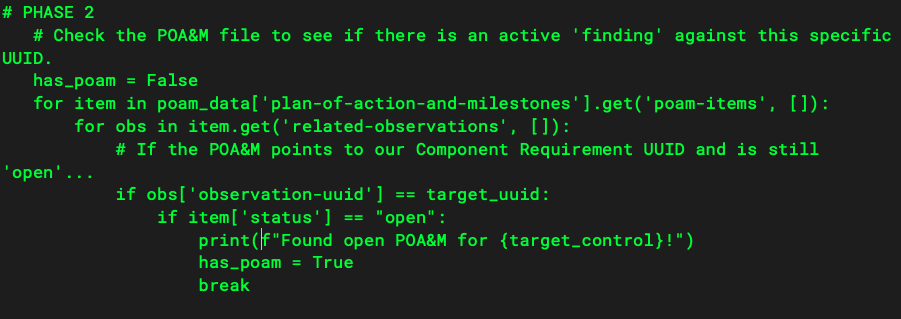
In phase 2 we are going to check for any open POAMs for this component that may be open. This is a simple search through the poam.json file using that “target_uuid” variable that we got from phase 1.
In this phase, if a POAM is found then the has_poam flag is set to true and will be used in phase 3.
PHASE 3:
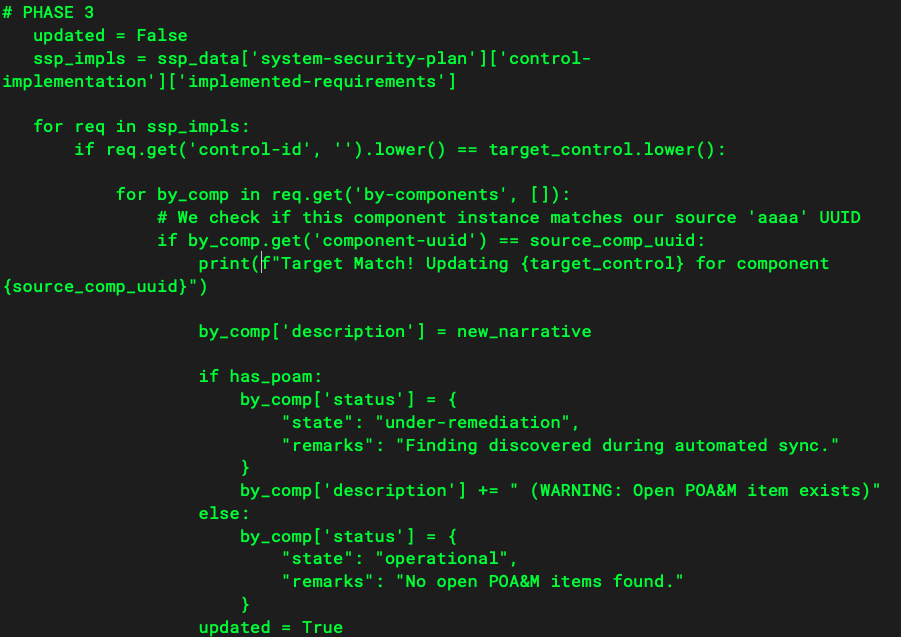
Phase 3 is where we actually update the SSP with the new narrative, the status, and the remarks. Using the new_narrative and source_comp_uuid from phase 1, as well as the has_poam flag from phase 2 we can make these updates.
After all the updates are made, we set the “updated” flag to True which carries us into phase 4.
PHASE 4:
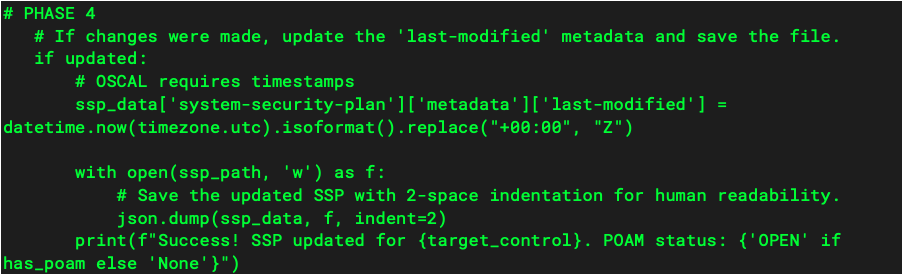
Phase 4 is all about saving the SSP and updating the timestamps to show when the latest update was made.
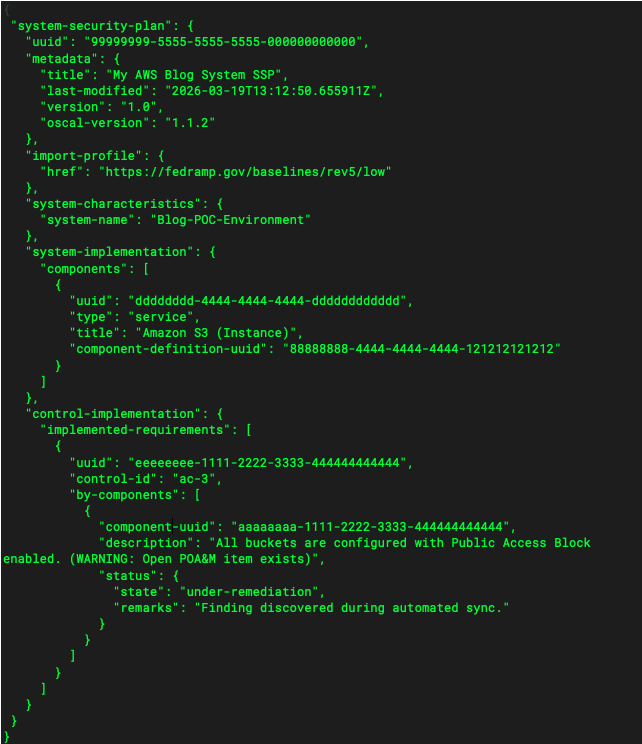
When we take all of these phases and put them together we get a script that will access multiple model files in the OSCAL architecture and update the SSP as needed. The console output and the newly updated SSP can be seen below.
OUTPUT:
python3 oscal_sync.py Targeting UUID: cccccccc-1111-2222-3333-444444444444 Found Narrative: All buckets are configured with Public Access Block enabled. Found open POA&M for ac-3! Target Match! Updating ac-3 for component aaaaaaaa-1111-2222-3333-444444444444 Success! SSP updated for ac-3. POAM status: OPEN
Closing Remarks
I know that was a lot. If you are struggling to visualize the connections, I highly recommend copying these files into your own environment and “breaking” them. Change a UUID, run the script, and see why it fails. That is how I truly “cracked the code” of OSCAL’s technical architecture.
We are swiftly moving toward the end goal: a fully automated SSP program that consumes live cloud configurations. In our final post, we will tackle the Automated Cloud Struggle. Using AWS and Python, I’ll show you how to detect new resources in real-time and update the SSP automatically — moving forever away from the static “compliance snapshot.”
I’ll also end that post with my true thoughts on OSCAL: The Good, The Bad, and The Ugly. I won’t hold back.